This task can only be performed by an SFX Administrator, and only if your organization has purchased Auto-Loader functionality.
Help for SFX - Secure File Exchange
|
This task can only be performed by an SFX Administrator, and only if your organization has purchased Auto-Loader functionality. |
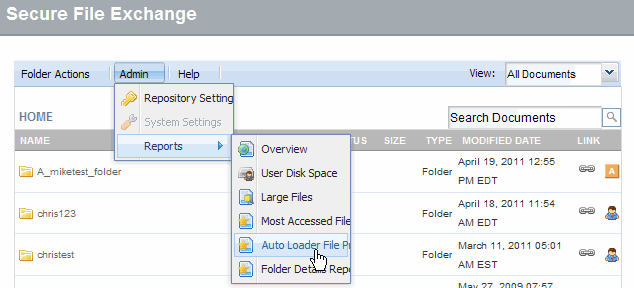
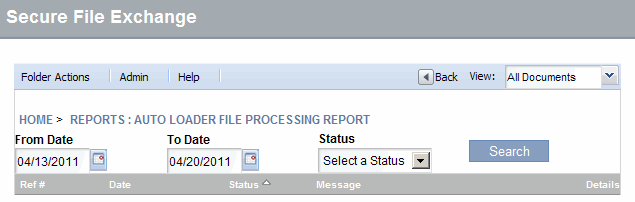
Click the Admin menu and select Reports -> Auto Loader File Processing. The report processing window displays.
In the report processing window, configure the report you want to generate by selecting options as required.
Modify the From Date
Modify the To Date
Select a Status
|
If you do not modify the default selections for the options, the report will include files of all statuses processed within the displayed date range. |
Click Search.
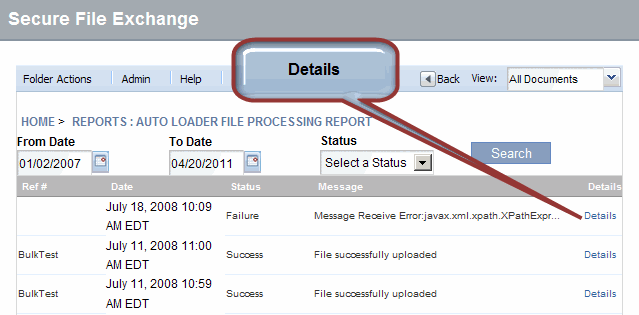
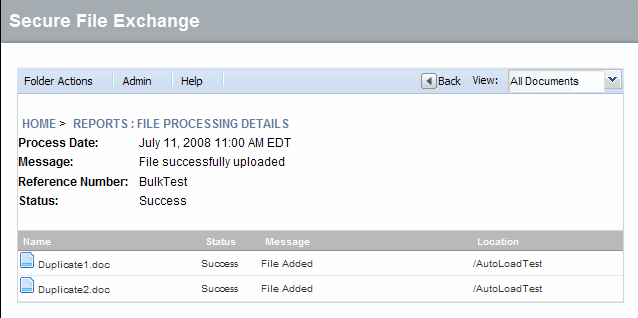
Click Details from the File Processing report. The report details display.
View report details as required. Click Back to return to the list and view another report.
RESULT:
You have successfully generated File Processing Report.