Navigate to the folder for which you want to require approval.
From the folder drop down menu, click Edit Properties. The Edit Properties window displays.
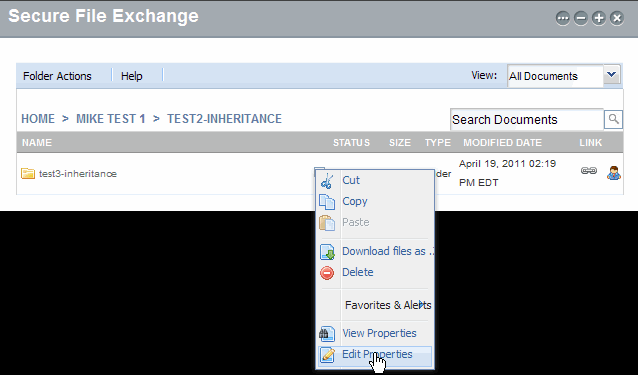
Select the Require approval check box. The Add Approvers option displays.
Help for SFX - Secure File Exchange
If your SFX Administrator configures all items in the repository to require approval, approvers are established at the repository level for all folders and files within the repository. You cannot turn off approval workflow for your items, and you cannot select your own approvers.
If approval is not required at the top repository level, you can require approval on folders for which you are the owner or administrator. Complete the following steps to require approval on a folder.
Navigate to the folder for which you want to require approval.
From the folder drop down menu, click Edit Properties. The Edit Properties window displays.
Select the Require approval check box. The Add Approvers option displays.
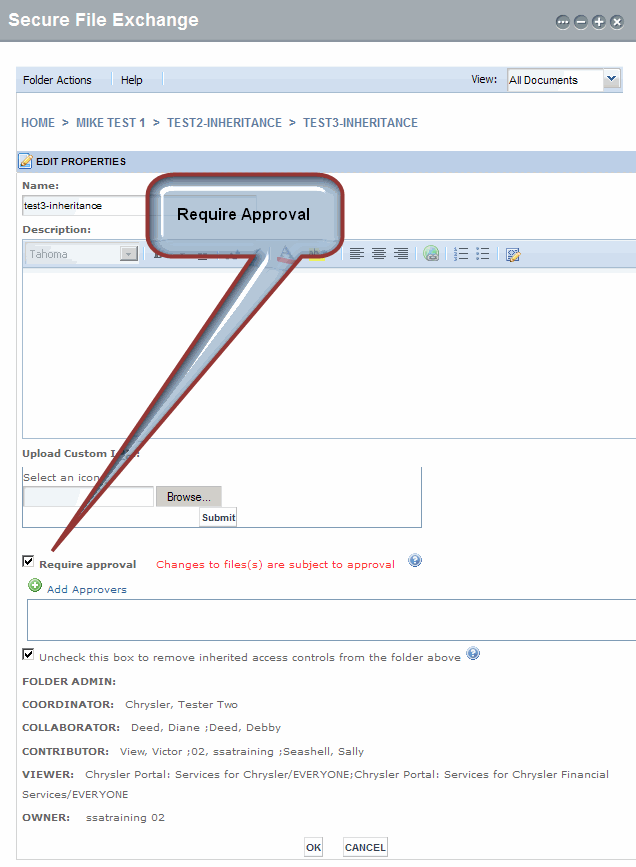
Select the Require approval check box. The Add Approvers option is enabled.
 next
to Add Approvers. The
User Directory window displays.
next
to Add Approvers. The
User Directory window displays.If you want to restrict your search to individual users, click the Include drop-down arrow and select Users from the list.
Click Find. The screen refreshes, and the search results display.
Select the check box of the users and groups you want to add as approvers. The users display in the Selected People box.
Repeat steps a through d as required until you are finished adding approvers.
Click OK. The User Directory window closes and the approvers display in the Add Approvers field.
Click OK. The screen refreshes, and a message confirming the updated properties displays.
RESULT:
You have successfully required approval on a folder.