Help for Supplier Connection - SUPPLIER GUIDE
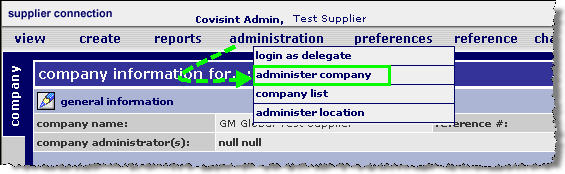
From the administration menu, click administer company.
Click ship from. The ship from screen is displayed.
Click  of the ship-from location
for which you wish to view details. The Location Details screen
is displayed.
of the ship-from location
for which you wish to view details. The Location Details screen
is displayed.

Click assign
users. The Assign Users to Location screen
is displayed.

Key in the user id of the person you wish to assign
to the location, then click GO.
|
|
User must meet the following criteria to be assigned to a location: - registered for and been approved to access Supplier Connection |
Enable the checkbox next to the user you wish to add.
Click assign. The screen refreshes, and the user is available to be added to the location.
Click cancel to return to the location information screen.
Assign privileges for this
user in this ship-from location by completing the steps in the section
entitled Assigning
User Privileges per Ship From Location.
RESULT:
You have successfully assigned users to ship-from locations. Assign privileges for this user in this ship from location by completing the steps in the section entitled Assigning User Privileges per Ship From Location.

