 Show me how >>>
Help for PHI Audit
Show me how >>>Create a Patient audit when you want to audit PHI data actions for a selected patient.
This procedure assumes you have logged in to your healthcare community and navigated to the PHI Audit Dashboard window. For details, refer to Access PHI Audit.
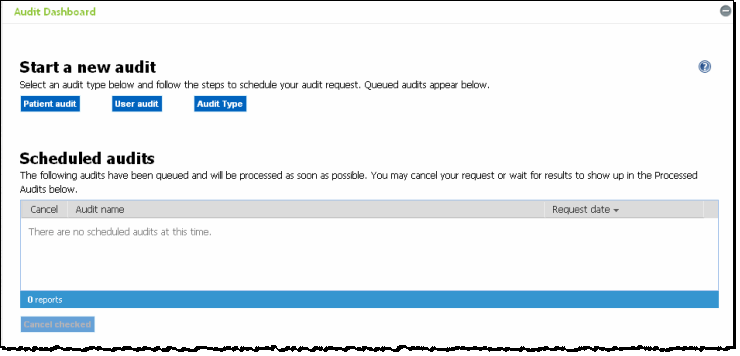
Perform the following steps to create a patient PHI Audit:
On the PHI Audit Dashboard
window, click Patient audit.
Step 1 of the Patient Audit Wizard
popup displays.
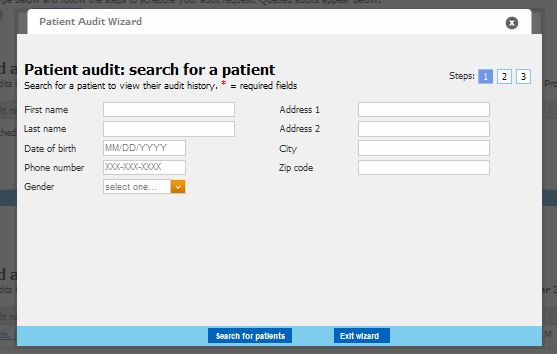
Enter your search criteria. Your search criteria may vary, depending
on your system configuration.
|
If you enter search criteria in an invalid format, the
|
When you are Finished entering search criteria, click Search for patients. If your search returns no results, or unexpected results, modify your search criteria and try again. Otherwise, the search results display in the Patient Audit Wizard Step 1 popup.
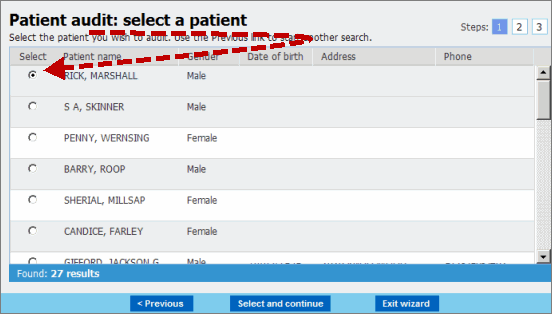
Select the patient whose PHI data you want to audit.
Click Select and continue. Step
2 of the Patient Audit Wizard
popup displays.

Specify a date range for the audit.
Note: The date range must be
no more than 30 days.
Enter dates in the required format, or
Click the  drop down
arrow to display a calendar from which you can select a date.
drop down
arrow to display a calendar from which you can select a date.
Select the Audit actions you want to include in the PHI patient data audit. For more information, refer to PHI Audit Overview.
Click Select and review. Step 3 of the Patient Audit Wizard popup displays.

Review your audit's date range and Audit actions criteria, and modify as required.
Optional - modify the Email Me When Processed field.
If you want to use the default email address for notification emails, leave the field as-is.
If you want the notification email to go to a different email address, click Clear, then enter the alternate email address.
Click Schedule audit.
The audit is scheduled, and a success window, similar to the following
displays.
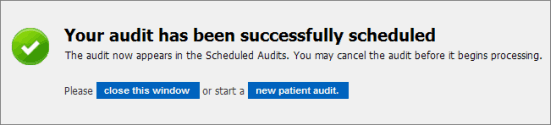
Click close this window. The audit wizard window closes and you are returned to the PHI Audit Dashboard window.
result
You have successfully created and scheduled a PHI patient data audit.

 error indication displays.
Hold your cursor over the indicator for details.
error indication displays.
Hold your cursor over the indicator for details.